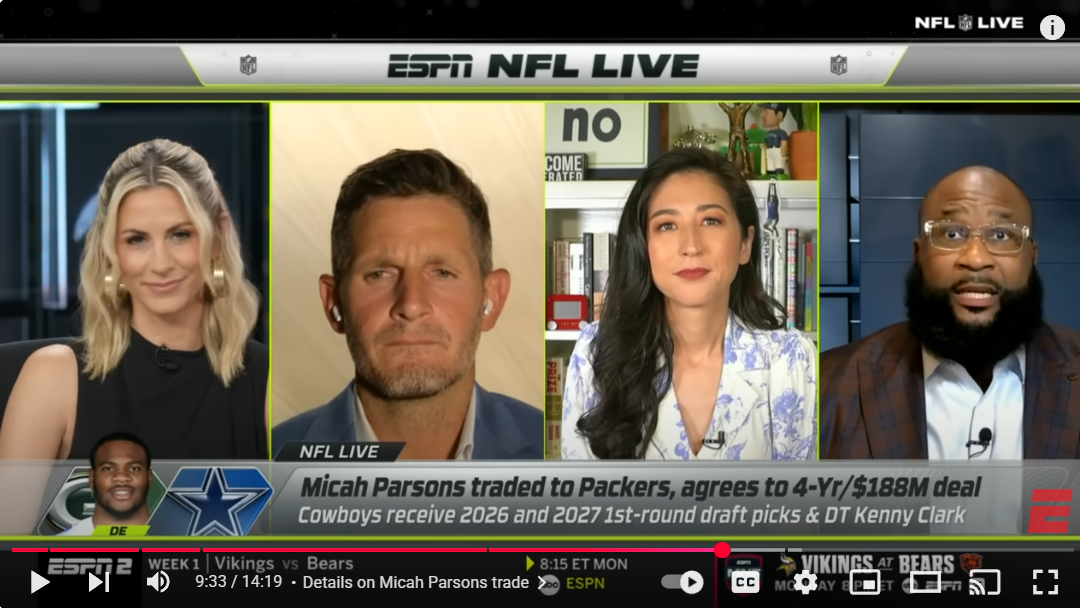
Turn on ESPN any time of day and you’re likely to see something like what’s pictured above. A host in studio talking to experts that are spread across the country. One of them is in a hotel room using his travel gear, another is in her home studio and one is on the set of another ESPN show. As the internet has gotten faster and high-quality audio and video equipment has gotten cheaper, this is the model TV has gone to for most of their multi-person shows or panel shows, whether their sports, news or entertainment. So, why does radio, for the most part, restrict itself to the old model of everyone always being in the same room? Here are some thoughts on that and how radio can adapt and adopt the multi-location model.
Yes, great audio is best created in a controlled environment. Audio quality is always going to be better when we’re broadcasting from professional, well-built studios that are strategically designed to keep outside noise from getting in and create just the right amount of presence within the room. However, with advancements in technology it’s significantly easier and less expensive to create very good audio in environments that are less than perfect. These advancements open up the option to pair our radio studios with talent in other locations.
There are three major keys to making it all work.
Get the right tools. Decide which USB mics you’re going to go with and use those across the board. I like the Shure MV7+, especially for stations using Shure SM7b mics in studio, and the Rode PodMic USB. Both have built in processing. Another option is to add a Rodecaster and use any preferred XLR mic. Similarly decide which webcam you’re going to use. My favorite ones right now are Osbot cameras, but there are TONS of great options. I would also go 4k even though most of your recording/streaming will be 1080. It’s not that much extra and it allows you to go 4k when you need to. Then, add Riverside to remotely record or live stream high-quality audio and video from anywhere. It’s essentially zoom for broadcasters, with additional AI tools to maximize content creation. That’s my affiliate link. If you use it to sign up, I’ll do a free 30-minute session with you to give you some tips and tricks on how to use it.
Find the right talent. For years proximity has been one of the big deciding factors for who we hire. Adjusting to multi-location recording means we are no longer bound by proximity, which opens up the talent pool considerably. It’s also a great way to test out shows before putting them live on the air. Yes, it’s true that we lose having another warm body to do remotes and events but that can be somewhat offset by putting in their contract that they’ll be in market X times per year if needed with the station covering travel. Plus, they’ll join X amount of live events virtually using Riverside.
Coaching them up. Doing a show remotely is different. It does negatively impact chemistry and talent’s ability to play off each other. However, only at first. With proper coaching, time and reps, talent will get used to it. Then, all the sudden, it will start to feel like they’re in the same room other than the occasional technical hiccups which can sometimes lead to comical moments anyway. Similar to all the things that have happened to any of us that have spent years being live on the radio. Talent coaching is one of my specialties, if you need help schedule a meeting to find out more. We can also help with best practices for setting up those home studios and travel setups.
Obviously, adding these tools, the right talent and coaching this new approach opens up another opportunity as well. Leveling up remotes by adding the element of video to every remote and giving the in-studio talent an easy way to interact with the on-site talent and easily incorporate them into their studio shows.
What do you think? Have you tried multi-location shows and, if so, how has it worked for you? Comment below or email me at Andy@RadioStationConsultant.com.